Bumblee: The Minimalist Sans Serif for Clean Digital Layouts
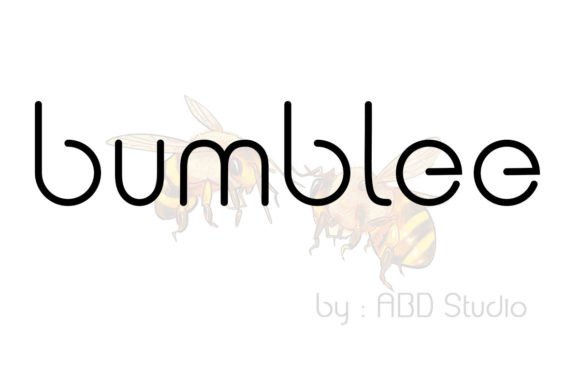
I was staring at a blank Figma canvas, trying to decide on the typography for a new boutique online store client. The brand identity was supposed to feel airy, modern, and trustworthy, but every font I pulled from my usual library felt either too corporate or too trendy. That was when I decided to test Bumblee. It is a minimalist and neat sans serif font that immediately caught my eye not because it was loud, but because it was quiet in the right way.
In web design, we often chase visual noise. We want headlines that scream. But Bumblee whispers with confidence. After dropping it into a hero section and previewing the mobile layout, I realized this typeface could easily be matched to an incredibly large set of projects. It doesn’t fight for attention; it organizes it. Here is how I integrated Bumblee into a real digital product project and why it might become your go-to choice for clean, professional layouts.
First Impressions: Clarity Over Decoration
The first thing you notice about Bumblee is its geometric precision balanced with humanist warmth. It sits comfortably in the sans serif category but avoids the coldness of some neo-grotesques. When I placed it over a high-resolution image banner for the hero section, the text remained legible without needing excessive contrast adjustments. This is crucial for modern web design, where users scroll quickly and expect instant readability.
I tested Bumblee as a display font for the main headline. The letterforms are open and inviting, which helps guide the user’s eye naturally down the page. Unlike some decorative fonts that require large sizing to be readable, Bumblee holds its shape even at smaller sizes. This makes it versatile for everything from massive H1 tags to subtle navigation labels. For a digital creator looking to establish a polished online brand experience, starting with a typeface that balances aesthetics with function is half the battle won.
Building Visual Hierarchy on Landing Pages
One of the biggest challenges in UI design is creating clear visual hierarchy without relying solely on color or size. Bumblee offers a range of weights that allow for nuanced distinction between sections. In the project I was working on—a coaching website—I used a heavier weight for section headings to create anchors for the reader’s eye, while lighter weights served as subheaders.
This approach helped structure the content logically. Users scanning the page could quickly identify the value proposition, the services offered, and the call to action. The neatness of the font reduces cognitive load. When typography is clean, users spend less time deciphering shapes and more time absorbing the message. This directly impacts engagement metrics, as visitors are more likely to stay on a page that feels easy to read.
- Headlines: Use Bumblee for strong, memorable titles that define the page’s purpose.
- Subheads: Utilize medium weights to break up long blocks of text and improve scannability.
- Body Copy: While Bumblee can work for short paragraphs, I found it best paired with a highly readable body font for longer articles.
Font Pairing Strategies for Web Design
No single font does it all, and Bumblee is no exception. Its strength lies in its ability to complement other typefaces. Since Bumblee is a minimalist sans serif, it pairs beautifully with almost anything. However, the most effective combination I discovered was pairing it with a classic serif font for body copy.
On a portfolio homepage redesign, I used Bumblee for all headers and UI elements, while a traditional serif handled the narrative text. This created a sophisticated editorial design feel. The contrast between the structured, modern sans serif and the organic, flowing serif added depth to the layout. It signaled professionalism and creativity simultaneously. If you are building a brand identity that needs to feel both contemporary and established, this pairing is hard to beat.
For those who prefer an all-sans approach, Bumblee works well alongside geometric sans serifs or neutral grotesques. The key is to ensure there is enough difference in x-height or weight to distinguish the roles of each font. Bumblee’s distinct character proportions make it stand out enough to serve as a primary display font without clashing with simpler supporting typefaces.
Readability Across Devices and Contexts
We cannot talk about modern typography without addressing responsive design. I tested Bumblee on various screen sizes, from wide desktop monitors to compact smartphone displays. On mobile screens, where space is premium, the font’s clean lines prevented clutter. It maintained its integrity even when scaled down for small buttons or footer links.
When placing Bumblee over image overlays, I noticed that its uniform stroke width provided excellent contrast against busy backgrounds. This is particularly useful for campaign landing pages where visual impact is paramount. Whether on dark backgrounds or light backgrounds, the font’s neutrality allows it to adapt seamlessly. For fast-loading visual content, using a well-optimized webfont like Bumblee ensures that text renders sharply without the "flash of invisible text" that can disrupt user experience.
Practical Applications in Digital Projects
Bumblee’s versatility extends beyond standard web pages. I have seen designers use it effectively in:
- E-commerce Banners: The clean aesthetic highlights products without competing with them.
- Social Media Graphics: Its modern look fits perfectly within Instagram stories or LinkedIn carousels.
- Digital Ads: Short phrases in Bumblee grab attention quickly due to their clarity.
- Course Sales Pages: It builds trust and authority, essential for converting visitors into students.
Technical Considerations and Licensing
Before integrating any premium font into a client project, it is vital to check the technical specifications. With Bumblee, I verified the included styles, ensuring there were enough weights (light, regular, bold) to build a robust typographic scale. Webfont availability is another key factor; ensuring the font supports woff2 formats helps maintain site speed.
Additionally, always review commercial font licensing. If you are using Bumblee for a client’s logo design, packaging design, or extensive web presence, confirm that the license covers these uses. Some fonts restrict embedding or limit the number of page views. By checking multilingual support and alternate characters, you also ensure that the font can handle diverse content requirements, making it a safer investment for global brands.
Why Bumblee Fits the Modern Creator
In a digital landscape saturated with complex designs and flashy animations, simplicity is a powerful differentiator. Bumblee embodies this principle. It is a creative font that respects the user’s need for clarity. As a web designer, adding it to your creative ideas means choosing a tool that enhances rather than distracts. It makes projects stand out by providing a stable, elegant foundation upon which other design elements can shine.
Whether you are redesigning a blog header, launching a new SaaS product, or crafting a digital brand kit, Bumblee offers the reliability and style needed for professional results. It proves that sometimes, the best way to be noticed is to be clear, concise, and effortlessly neat.